Looking for the right WoW Forever addon setup for leveling? WoW Forever launched on November 4, and most of the big names already have a Forever version - but not all of them, and your old Classic addons won't load. This guide lists the 15 must-have addons for WoW Forever leveling, from quest helpers and maps to bags, gear and dungeon tools, plus what each one does for you between level 1 and 60, which popular addons don't work yet, and how to install them in the Forever game folder.
We've included our own addon, Forever Upgrades Export, at number 2 - it's the one that connects your character in game to the upgrade finder and sims on this site. The other 14 are community addons we don't make or control.
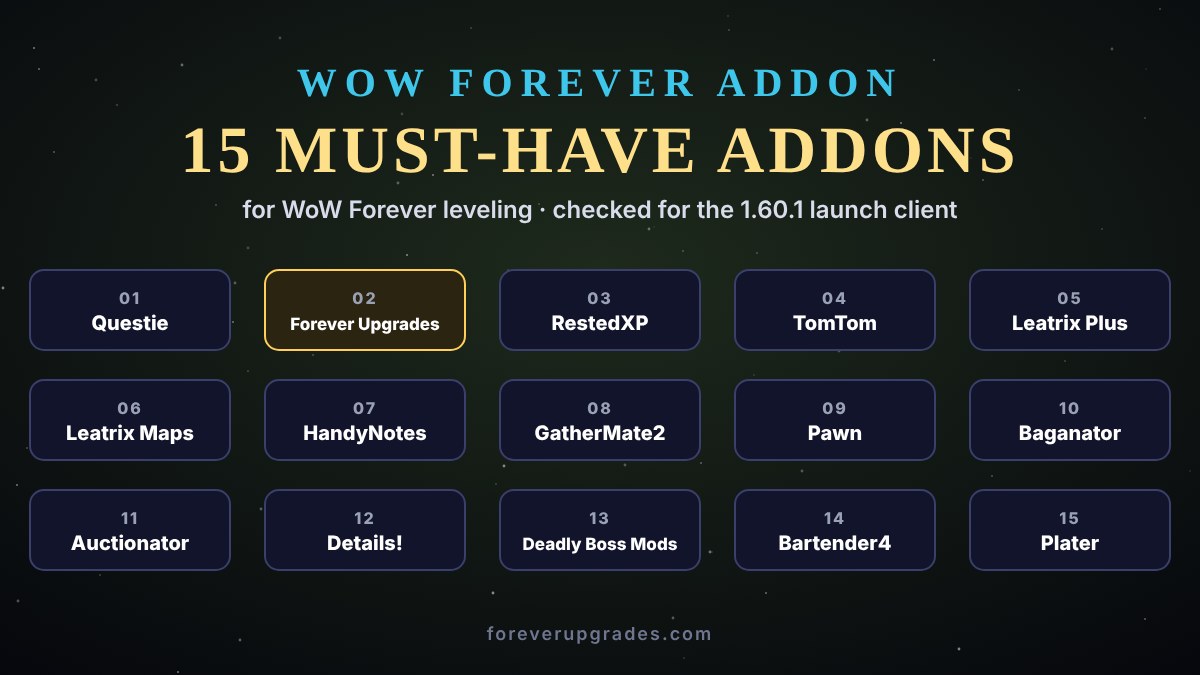
WoW Forever addons: the short version
- Classic addons don't work in Forever. Forever runs on the modern WoW interface, so every addon needs its own Forever file - game version 1.60.1, interface number 16001.
- Install folder:
World of Warcraft\_forever_\Interface\AddOns. The beta's_classic_beta_folder is a different game folder. - The essentials for leveling: Questie for quests, TomTom and Leatrix Maps for finding your way, Leatrix Plus for small time savers, Pawn for gear, Baganator for bags - and Forever Upgrades Export to sim your upgrades.
- Not available yet: WeakAuras, OmniCC and TradeSkillMaster had no Forever version at launch.
- Built into the game: Forever has its own Cooldown Manager, Damage Meter, Edit Mode, Aggro Display and controller support, so you need fewer addons than in Classic.
The statuses below come from Timesaver's launch list, last checked on November 3 - the day before launch - and ConquestCapped's addon guide. Several authors were still pushing files in launch week, so always pick the newest file marked Forever (or 1.60.1) on the addon's CurseForge or GitHub page.
Why addons matter for WoW Forever leveling
Leveling from 1 to 60 is a long trip, and most of the time you lose isn't spent fighting - it's spent working out where the next objective is, walking back to a vendor with full bags, comparing two items in your head, or finding the quest giver you missed. Good leveling addons cut exactly that time. None of them play the game for you; they put the information you'd otherwise look up on a website straight on your screen.
The 15 must-have WoW Forever addons for leveling
1. Questie - quest helper
Questie is the one addon almost every leveler installs first. It marks quest givers, objectives and hand-ins on your map and minimap, shows which mobs or objects you need, and lists the quests you can pick up nearby - so you spend less time reading quest text and more time questing. It works well with our WoW Forever leveling guide for levels 1-30, which gives you the order to do them in.
- Status: working - Forever build v12.4.0 (November 2), published alongside the Classic builds.
2. Forever Upgrades Export - gear upgrades and sims (our addon)
Our own addon reads your character in game - every equipped item, enchant, talent, your spec and level - and turns it into one line of text. Type /fup or click the Forever Upgrades button on your character sheet, press Ctrl+C, and paste it into Find Upgrades to see the best upgrade for every slot as "+X DPS", or into the WoW Forever rotation simulator for a full simulation, spell by spell. While leveling, it's the quickest way to know whether a quest reward or dungeon drop is really better than what you're wearing. It's free, about 5 KB and open Lua you can read; the addon page has the install steps.
- Status: working - built for the Forever client (interface 16001), on CurseForge.
3. RestedXP Guides - leveling guide
RestedXP shows a step-by-step leveling route in a small window: which quests to take, where to go, what to kill and when to hand in. The addon itself is free, and so is its starting route - to about level 20 for the Alliance and 22 for the Horde, according to ConquestCapped. The full 1-60 Forever guides are sold separately on RestedXP's site. Paid routes are a grey area under Blizzard's add-on policy, which says add-ons must be free; we covered the debate in our article on paid leveling guides. If you'd rather not pay, Questie with our free quest route does the same job.
- Status: working - v4.11.29 (October 29).
4. TomTom - waypoints
TomTom adds a waypoint arrow that points to any coordinates you type in. Every quest on our quest pages lists its coordinates, so you can paste them as a /way command and follow the arrow straight to the next objective - handy in zones you don't know yet, such as the new Riverglades and Mount Hyjal.
- Status: working - v4.3.13 (October 24).
5. Leatrix Plus - quality of life
Leatrix Plus bundles dozens of small quality-of-life options into one addon, such as selling junk and repairing automatically at vendors, and lets you switch each one on or off. Over 60 levels, those few seconds per vendor visit add up.
- Status: working - 1.60.25 (October 21). Download the file with "forever" in its name, not the Classic one.
6. Leatrix Maps - world map
Leatrix Maps improves the world map: it can show the areas you haven't explored yet, show coordinates and let you resize and move the map, so you can keep it open while you walk.
- Status: working - 1.60.25 (October 21). Again, take the "forever" file.
7. HandyNotes - map notes
HandyNotes lets you place your own notes on the map - a rare spawn, a hidden quest giver, a good grinding spot - and it's the framework many map plugins build on.
- Status: working - v1.6.32 (November 3).
8. GatherMate2 - gathering
If you take Herbalism, Mining or Skinning while leveling, GatherMate2 remembers every node you've found and shows it on your map, so your gathering route gets better each time you pass through a zone. Our professions page and best profession for every class guide help you choose.
- Status: working - 1.52.4 (November 3), from GitHub.
9. Pawn - gear comparison
Pawn adds an upgrade arrow to item tooltips, so you can see at a glance whether a quest reward or a drop is better for your spec. Pawn's scale is a quick rule of thumb; for the actual numbers, paste your character into Find Upgrades, which simulates each item, and check the stat weights in your class guide (for example the Arms Warrior guide).
- Status: working - 2.14.1 Forever (November 2), a separate Forever file.
10. Baganator - bags
Baganator combines all your bags into one window, sorts them and lets you search your items - and, with its companion Syndicator, it shows what your other characters are carrying. With bags no longer equipping themselves in Forever, a tidy bag window helps. Prefer the classic look? Bagnon works too.
- Status: working - Baganator 839 (October 28), Bagnon 12.1.7 (October 15).
11. Auctionator - auction house
Auctionator makes the auction house faster: quick searches, shopping lists, price history and one-click posting. Selling the materials you gather while leveling is the easiest early gold in the game - and gold pays for your spell ranks and your mount.
- Status: working - 341 (October 13). TradeSkillMaster had no Forever version at launch.
12. Details! - damage meter
Details! shows your damage, healing and threat per fight. While leveling it's most useful in dungeons, and for checking that a new talent or rotation really helps. Forever also has a built-in Damage Meter if you want something lighter. To compare your numbers with what your spec should do, see the WoW Forever DPS rankings.
- Status: working - build 15339 (October 16).
13. Deadly Boss Mods - dungeon and raid timers
Forever's nine new dungeons start at level 13, and Deadly Boss Mods warns you about boss abilities before they hit. Install DBM or BigWigs - not both. LittleWigs, BigWigs' dungeon module, had no Forever version at launch, so DBM is the easier choice for leveling dungeons.
- Status: working - DBM 12.1.19 (November 3); BigWigs v427.8 (October 23).
14. Bartender4 - action bars
Since the final pre-launch build, new spells no longer go on your action bars automatically, so you'll be placing every new rank yourself. Bartender4 gives you more bars, keybinds you set by hovering over a button, and bars you can hide out of combat. Dominos is a lighter alternative.
- Status: working - Bartender4 4.18.4 (November 3), Dominos 11.5.1 (October 31).
15. Plater - nameplates
Plater makes enemy nameplates easier to read - health, cast bars and debuffs above every mob - which helps when you pull two or three at once or tank in dungeons. It also covers cast bars, since ClassicCastbars had no Forever version at launch.
- Status: working - v662 (October 28).
Honourable mentions
These didn't make our top 15 for leveling, but they all had a Forever file in Timesaver's November 3 check and are worth a look:
- Simple Item Levels - item levels on your gear and bag icons.
- Narcissus - a nicer character screen and gear view.
- AtlasLoot Classic Forever - browse dungeon and raid loot. It's a separate project from the Classic Era AtlasLoot; for simulated best-in-slot gear, use our WoW Forever BiS lists.
- Nova Instance Tracker - tracks your dungeon runs and lockouts.
- ElvUI - a full interface replacement. It isn't on CurseForge, so download it from its official release and install it by hand; ConquestCapped notes it doesn't support gamepads yet.
- Prat 3.0 or Chattynator - better chat windows for finding groups.
- Clique, VuhDo, HealBot or Grid2 - click-casting and raid frames for healers.
- BugSack - catches Lua errors so a broken addon doesn't spam your screen.
- Wisp - a free ForeverWisp leveling addon with starter routes to level 20; some extra guide packs are paid.
WoW Forever addons that don't work yet
As of Timesaver's November 3 check, these popular addons had no Forever version. Don't force them on with "Load out of date AddOns" - they were written for a different game client:
- WeakAuras - no official Forever build. Community forks called Musca Auras and ForeverAuras exist, but they aren't made by the WeakAuras team and old import strings may not behave the same. For basic cooldown tracking, try the built-in Cooldown Manager first.
- OmniCC - no Forever file.
- TradeSkillMaster - no Forever version, and none announced; use Auctionator.
- Postal - retail only; a community port called Posty is listed for Forever.
- NovaWorldBuffs, Spy Classic, ClassicCastbars, LittleWigs, Cell and RCLootCouncil Classic - no Forever files yet. Plater covers cast bars, VuhDo, HealBot or Grid2 replace Cell, and Gargul handles raid loot.
Why the gap? Forever uses the newer combat rules of modern WoW, under which addons can show combat information but can't use it to make decisions for you. That hits alert and rotation addons like WeakAuras hardest, while quest, map, bag and auction house addons are much easier to port - which is why leveling players are well covered at launch. Our earlier WoW Forever addons guide has more on that.
How to install WoW Forever addons
- With an addon manager. In the CurseForge app (or Wago), make sure it's pointing at your Forever game folder, search for the addon and install its Forever file. Use one manager, not two - they can overwrite each other's files.
- By hand. Download the Forever file, unzip it, and put the addon's folder directly in
World of Warcraft\_forever_\Interface\AddOns- each addon's folder, with its .toc file, must sit right inside AddOns, not in another folder. - In game. On the character select screen, click AddOns and check that each one is ticked. If an addon shows as out of date, look for a newer Forever file rather than loading it anyway.
- Your old settings. Settings from the beta don't carry over automatically. If you want to keep a layout, copy the addon's files from the beta's WTF folder - but expect some addons to need setting up again.
- Forever Upgrades Export: unzip it so you end up with
Interface\AddOns\ForeverUpgradesExport\ForeverUpgradesExport.toc, then restart the game or type/reload.
Addons or built-in features?
WoW Forever gives you more out of the box than Classic did, so before you install something, check whether the game already does it. Timesaver's launch list names five built-in features that replace common addons:
- Edit Mode lets you move and resize most of the interface - unit frames, action bars, the minimap - without an addon. If you only want to move a few frames, try it before installing a full interface replacement.
- Damage Meter covers the basics of Details! for most players. Install Details! if you want threat, per-spell breakdowns or past fights.
- Cooldown Manager tracks your important cooldowns and buffs - the simple part of what WeakAuras used to do.
- Aggro Display shows when a mob is on you - useful when you're grouped in a starting zone or tanking a dungeon.
- Controller support is built in, with movement, spells and interactions set in Edit Mode and the Options menu.
The rule of thumb for leveling: use the built-in tool when it does the job, and add an addon only when you notice something missing. Every addon you add is one more thing that can break when the game patches.
Setting up your addons for leveling
Most of these addons work out of the box, but a few minutes in their settings pays off over 60 levels:
- Questie: decide how much it shows. A map full of icons is helpful at level 5 and noisy at level 40, so many players hide quests far below their level and keep only the ones worth doing.
- RestedXP or Wisp: pick a route for your race and stick to it - leveling guides work best when you don't skip steps.
- TomTom: keep the arrow small and near the middle of your screen. Paste the coordinates from our quest pages as
/waycommands before you leave town. - Leatrix Plus: go through the list once and turn on the time savers you want, such as automatic junk selling and repairs. Leave anything you're unsure about off.
- Pawn: choose the scale for the spec you're leveling as. If you change spec later, change the scale too.
- Bartender4: set up one bar for your rotation and one for utility, then check your spellbook after every trainer visit - new ranks don't go on your bars by themselves.
- Baganator: turn on sorting and put your profession materials in their own section, so you can see at a glance what to sell.
- Forever Upgrades Export: after each new piece of gear or every few talent points, type
/fupand paste the text into Find Upgrades to see what to aim for next.
Recommended WoW Forever addon setups
- Minimal (5 addons): Questie, TomTom, Leatrix Plus, Pawn and Forever Upgrades Export. Everything else is built in.
- Solo leveler: the minimal set plus Leatrix Maps, Baganator, Bartender4 and Auctionator.
- Gatherer: add GatherMate2 and HandyNotes, and sell your materials with Auctionator.
- Dungeon leveler: add Details!, Deadly Boss Mods and Plater - and a healer adds Clique with VuhDo, HealBot or Grid2.
- Guided route: RestedXP or Wisp for a step-by-step route, or Questie plus our free 1-30 quest route if you don't want to pay.
Leveling faster with Forever Upgrades
Addons are half the story. For the rest of your leveling, our free tools work alongside them: plan your build in the WoW Forever talent calculator, follow your class's leveling guide - Warrior, Paladin, Hunter, Rogue, Priest, Shaman, Mage, Warlock or Druid - check your spec's rotation and stat priority in its class guide (for example Beast Mastery Hunter or Arcane Mage), and use quest reward upgrades to pick the right reward from every quest. Our WoW Forever launch first hour checklist covers the settings that changed at launch.
WoW Forever addon FAQ
- Do Classic addons work in WoW Forever? No. Forever needs its own addon files, for game version 1.60.1 (interface 16001).
- Where is the WoW Forever AddOns folder?
World of Warcraft\_forever_\Interface\AddOns. - What's the best WoW Forever addon for leveling? Questie - it shows every quest giver and objective on your map.
- Is there a free WoW Forever leveling guide addon? Yes: Questie plus our free quest route, or the free starting routes in RestedXP and Wisp.
- Is WeakAuras in WoW Forever? Not officially at launch. Community forks exist; the built-in Cooldown Manager covers the basics.
- Is there a damage meter? Yes - Details!, and Forever has a built-in Damage Meter too.
- Are WoW Forever addons allowed? Yes - addons are a normal part of WoW. Blizzard's add-on policy says they must be free.
- How do I see my upgrades? Install Forever Upgrades Export, type
/fup, and paste the text into Find Upgrades.
More from Forever Upgrades
Find everything else for WoW Forever on the home page: news, Sim DPS, Find Upgrades, BiS lists, talents, items, quests, professions, our addon, the FAQ, about us and contact.
Sources
- WoW Forever Addons: Every Addon That Works at Launch (Timesaver, October 19, updated November 3, 2026)
- Best WoW Forever Addons That Work at Launch (ConquestCapped, updated October 19, checked October 29, 2026)
- WoW Forever Leveling Addon: Wisp (ForeverWisp, reviewed November 2, 2026)
- World of Warcraft UI Add-On Development Policy (Blizzard forums)
- Forever Upgrades Export (CurseForge)
- Destructoid's summary of Blizzard's November 2 development notes (spells no longer added to action bars, bags no longer equipped automatically), as cited in our first hour checklist