The WoW Forever rotation simulator is a free tool on Forever Upgrades that plays your character's rotation in 1,000 boss fights and tells you exactly how much damage you do - and where every point of it comes from. Paste your armory link or an export from our in-game addon, press one button, and a few seconds later you have your DPS, the damage of every ability, how often you cast it, and whether you ran out of mana.
WoW Forever changed a lot of classes from the original game. Arcane Mages build and spend with Arcane Blast and the new Arcane Wrath, Fire Mages fire Pyroblast from Hot Streak stacks, Hunters summon Hawks, Survival fights in melee, and Heroic Strike is instant. Old Classic simulators don't know any of that. This guide explains what the WoW Forever rotation simulator does, how to use it, what every option means and how to read your result.
Open the WoW Forever rotation simulatorPaste your armory link or addon export and the simulator plays your spec's rotation in 1,000 boss fights - your DPS, ability by ability.Sim my character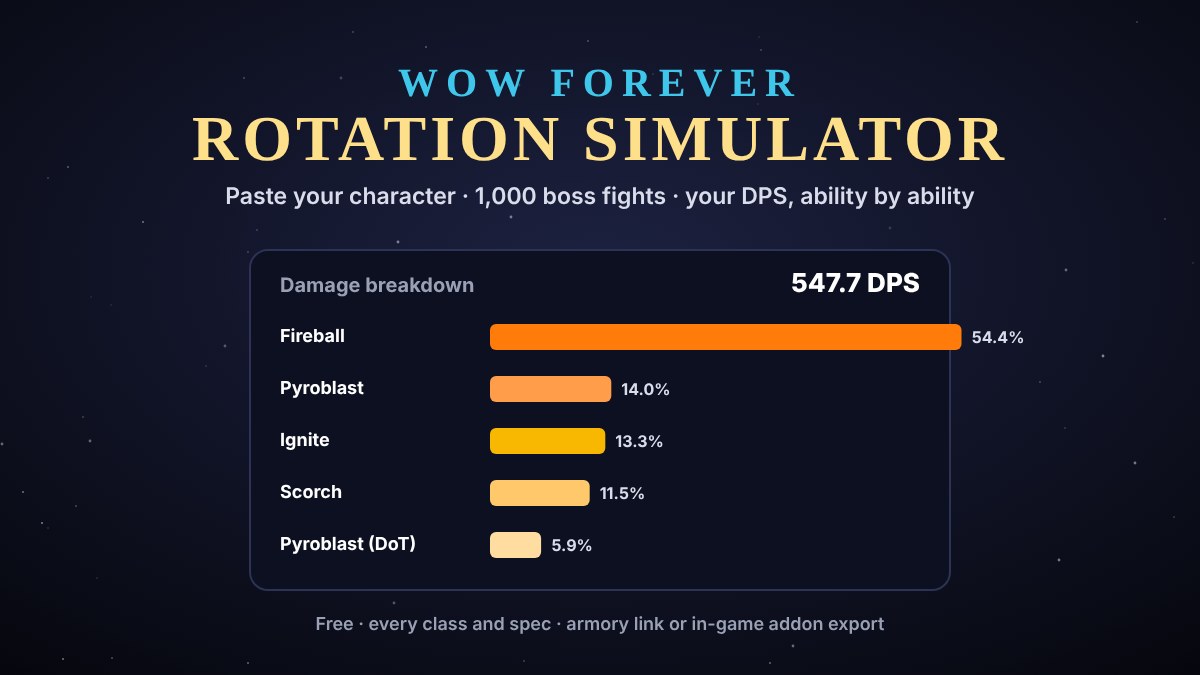
WoW Forever rotation simulator: the short version
- What it is: a free DPS and rotation simulator for World of Warcraft: Forever, on our Sim DPS page.
- What you need: a Blizzard armory link (or classic-armory.org) - or the text from our free addon, copied in game with /fup.
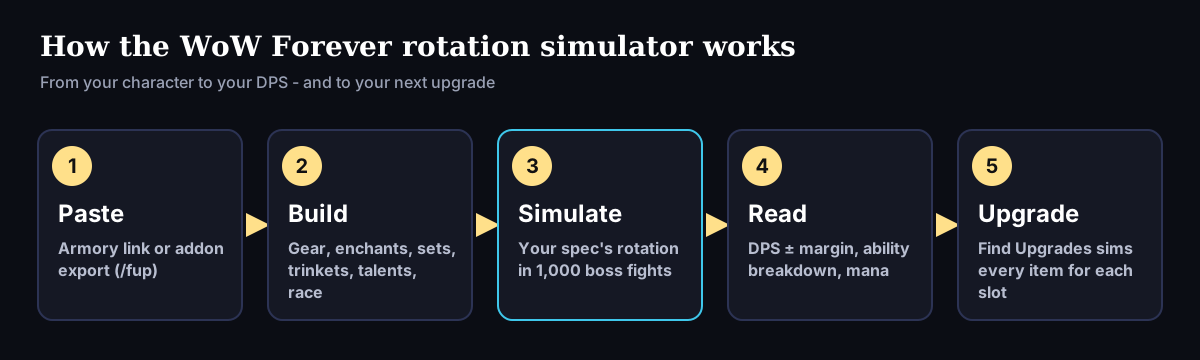
- What it does: builds your character from your gear, enchants, set bonuses, trinkets, talents and race, then plays your spec's rotation against a boss 1,000 times.
- What you get: your average DPS with a margin of error, a breakdown of every ability's damage and casts, your time out of mana, your trinket uptimes and the spell ranks it used.
- Options: fight length (1, 2, 3 or 5 minutes), target level, race and an optional talent build link.
- Every class: all 20 damage specs, plus healers (healing per second) and tanks (effective health).
What the WoW Forever rotation simulator does
A rotation simulator doesn't use a formula. It plays the fight. The WoW Forever rotation simulator takes your character, works out your stats exactly as the game would, and then plays your spec's rotation second by second against a raid boss: casting, swinging, missing, critting, proccing, running low on mana or rage, using cooldowns when they're ready. Then it does it again - 1,000 times - and averages the result.
That's why the number comes with a margin. Each fight has its own misses, crits, resists and procs, so no two fights are the same. A result like 547.7 ± 3.2 DPS means nearly all of the 1,000 fights landed within a few points of that average. The more random your spec - lots of procs, lots of crit-based talents - the more those 1,000 fights matter.
How to use the WoW Forever rotation simulator
It takes about a minute the first time:
- Open the simulator. Go to the WoW Forever rotation simulator - the Sim DPS page in our menu.
- Paste your character. Either a Blizzard armory link to your character page, or the text from our Forever Upgrades Export addon (it starts with !FUP:).
- Check the options (optional): fight length, target, race and talent build.
- Press Sim DPS. The simulator reads your gear, builds your character and runs 1,000 fights. It takes a few seconds.
- Read your result: your DPS, your equipped gear, and the damage breakdown for every ability.
Armory link or addon: which should you use?
Both work, but the addon is more accurate. An armory page shows what your character wore when it was last saved, and it may not show everything the simulator needs.
Our free Forever Upgrades Export addon reads your character directly in game: every equipped item, every enchant, your talents, your spec and your level. Install it once, then type /fup in chat (or click the Forever Upgrades button on your character sheet), press Ctrl+C, and paste the text into the simulator. Change your gear or talents, type /fup again, and the simulator always sees exactly what you're wearing right now.
The rotation simulator options, explained
Open Options under the input box to change how the fight is run. Each option changes your number, so it's worth setting them to match how you actually play:
- Spec: read from your armory or addon. You can override it if you want to see how another spec of your class would do in your gear.
- Fight length: 1, 2, 3 or 5 minutes. Short fights favour specs and talents with big burst cooldowns; long fights favour steady damage and good mana management. Pick the length of the bosses you actually fight.
- Target: a raid boss (your level +3), an elite (+2) or a same-level target. A raid boss has more dodge and resistance and is harder to hit, so it's the lowest number and the one that matters for raids.
- Race: your character's own race, or any race - Human, Dwarf, Night Elf, Gnome, Skyborne, Orc, Undead, Tauren or Troll. Racials are simulated, so this is the quickest way to see what a different race would do for you.
- Talent build: paste a build link from talentsforever.com if you're using an armory link. If you use the addon, it already knows your talents.
Reading your result
The result page has three parts: your character and DPS at the top, your equipped gear, and the damage breakdown. The breakdown is the most useful part of the WoW Forever rotation simulator: it lists every ability's damage per second, its share of your total and how many times you cast it per fight.
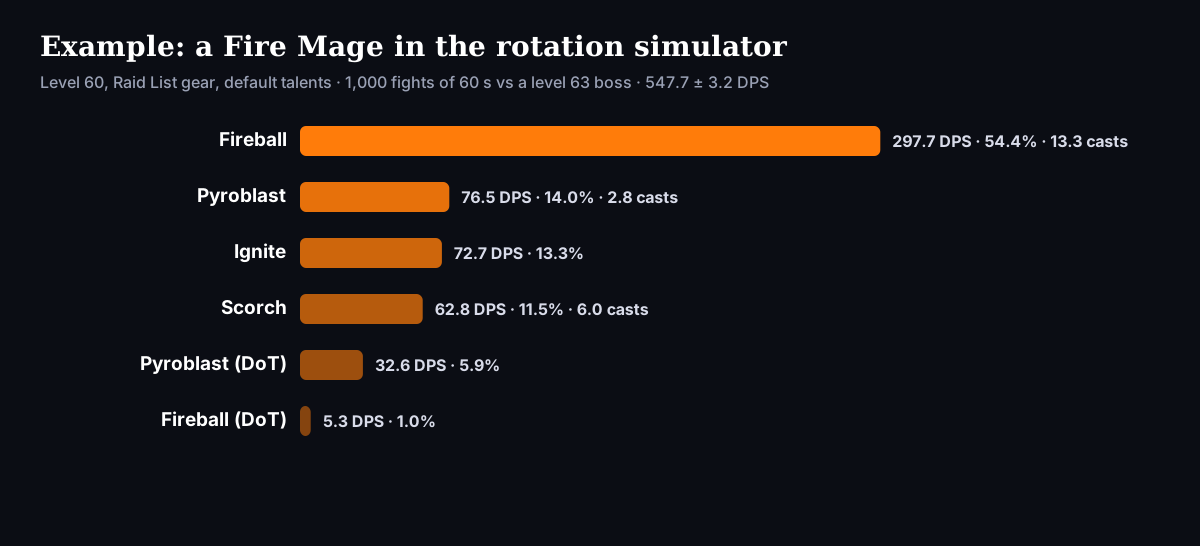
Here's how to read it, using the Fire Mage above - level 60, Raid List gear, default talents, 547.7 ± 3.2 DPS:
- Fireball does 54.4% of the damage with 13.3 casts per one-minute fight. It's the main nuke, so that's expected.
- Pyroblast adds 14.0% from just 2.8 casts - in WoW Forever it's fired from Hot Streak stacks, so every one hits hard - plus another 5.9% from its burn.
- Ignite does 13.3% with no casts at all - it's a talent that turns your crits into extra burning damage. Damage over time and procs are listed separately, so you can see exactly what your talents are worth.
- Scorch does 11.5%. The rotation casts it to keep five stacks of Improved Scorch on the boss, which makes every other Fire spell hit harder.
If a big ability is doing less than you expect, the breakdown usually tells you why: too few casts means you're short on mana or the fight is too short for its cooldown; a low share for a talent proc means you need more crit.
Everything else the simulator shows you
Below the breakdown, the WoW Forever rotation simulator shows the details behind your number:
- Time out of mana: how many seconds per fight you spent unable to cast. For casters and healers, this is often the first thing to fix.
- Trinkets and procs: every on-use or proc item it modelled, with its uptime. Our Fire Mage's Essence of Sapphiron, for example, is up a third of the fight.
- Set bonuses: which bonuses the simulator modelled - and which it didn't, with the reason. We'd rather tell you an effect isn't in your number than quietly guess.
- Spell ranks: the rank of each spell it used, so you can check you've trained the highest ones.
- Your buffs and stats: the self-buffs it applied (like Arcane Intellect and Mage Armor) and your final crit, hit, spell power and mana.
- The rotation: the exact priority the simulator played for your spec.
How the simulator plays your rotation
Every spec plays a priority list - the rotation a good player uses, from that spec's class guide on our site. At every moment the simulator looks down the list and casts the first ability that's ready and worth casting. That means it handles the things a fixed "one, two, three" rotation can't: holding a spell when you're low on mana, refreshing a debuff just before it falls off, saving a cooldown for the execute phase, or spending a proc the moment it appears.
Behind the priority, each class has its own simulation engine, with separate engines for specs that play very differently - Enhancement and Restoration Shamans, Survival Hunters, Feral and Restoration Druids, Shadow Priests, Retribution and Protection Paladins, and Protection Warriors all have their own. Every engine is built around WoW Forever's own rules, not Classic's. A few examples:
- Mage: Arcane Blast stacks that turn 15% of your Intellect into spell damage, Arcane Wrath, and Pyroblast fired from Hot Streak stacks.
- Warrior: instant Heroic Strike with no next-swing queue, normalized rage per landed swing, and Bloodthrill enabling Overpower on a Rended target.
- Hunter: Summon Hawk on Arcane Shot's cooldown, pets that scale with your gear, Lone Wolf for Marksmanship, and Survival as a melee spec.
- Druid: Feral Cat Form attacks that scale with your weapon's damage, and Berserk in place of Tiger's Fury.
- Warlock, Shaman and Priest: Wrack for Affliction, Lava Burst and Elemental Mastery for Elemental, Stormstrike and Maelstrom Weapon for Enhancement, and Shadowform's doubled Shadow crits for Shadow.
Our rotation guide for every class lists the exact priority the simulator plays for each spec, and each class guide explains why every step is there.
Where the numbers come from
A simulator is only as good as its data. The WoW Forever rotation simulator takes its numbers from the WoW Forever game files themselves (build 1.60.1.70532): every spell's ranks, damage, coefficients, mana cost and cast time, every item's stats, and every talent's effect. Where WoW Forever changed a spell - a new cooldown, a new coefficient, a new talent - the simulator uses the new value, not the Classic one.
On top of that data sit the fight rules: hit and crit against a boss three levels higher, partial resists, dodge and glancing blows for melee, normalized rage for Warriors, energy and combo points for Rogues and Feral Druids, and mana regeneration for everyone who casts. Each of the 1,000 fights rolls all of it again.
Using the rotation simulator to test changes
Your DPS on its own is a starting point. The real value of a rotation simulator is comparing two versions of your character. A few ways to use it:
- Test a race change. Pick another race in Options and sim again. The difference is what that race's racials are worth to you, in your gear.
- Test fight length. Sim at 1 minute and at 3 or 5 minutes. If your number drops a lot in long fights, mana or a long cooldown is the reason - check your time out of mana.
- Test a talent build. Make a build on talentsforever.com, paste the link into Options, and compare it with your current one.
- Test an item. Equip it in game, export with /fup and sim - or let Find Upgrades test every item for a slot at once.
- Test a target. Compare a raid boss with an elite target to see how much hit you're missing against bosses.
Change one thing at a time. Two sims that differ in only one way tell you exactly what that one thing is worth.
Healers and tanks in the rotation simulator
Damage isn't the only thing it measures. Healers are simulated in healing per second (HPS) - casting their own priority of heals, shields and heals over time against a raid's damage. Tanks are measured in effective health against a boss hitting them for the whole fight, because a tank's job is to stay alive.
So a Holy Priest, Restoration Druid or Protection Warrior can use the WoW Forever rotation simulator the same way a Mage can: paste, sim, and see what their gear and talents are worth.
Rotation simulator for every class and spec
Every class guide on our site includes the rotation the simulator plays, the spec's stat priority and its consumables. Jump to yours:
- Warrior: Arms, Fury, Protection
- Paladin: Holy, Protection, Retribution
- Hunter: Beast Mastery, Marksmanship, Survival
- Rogue: Assassination, Combat, Subtlety
- Priest: Discipline, Holy, Shadow
- Shaman: Elemental, Enhancement, Restoration
- Mage: Arcane, Fire, Frost
- Warlock: Affliction, Demonology, Destruction
- Druid: Balance, Feral, Restoration
Spec rankings: every spec in the same simulator
Below the input box, the Sim DPS page also ranks every spec. These rankings use the same WoW Forever rotation simulator, with the same rules for everyone so the ranking compares the specs, not their luck or their gear:
- Gear: at level 60, each spec's own BiS list - the Raid List (epic) or the Dungeon List (rare) - without enchants. At levels 50 and 30, the same standard gear for each role.
- Fight: default talents and the guide rotation, 1,000 fights of 60 seconds against a boss three levels higher, with raid buffs, world buffs and consumables left out.
- Race: each damage and healing spec in its best race, racials included. Tanks are race-neutral.
- Same seed: every run uses the same random seed, so clicking a spec shows exactly the number in the ranking - with its gear, talents, buffs and damage breakdown.
For what those rankings mean for picking a class, see our best DPS class in WoW Forever and best healer articles.
From your DPS to your next upgrade
The rotation simulator tells you where you are. Find Upgrades tells you where to go next: it runs the same simulation for every item that fits each of your slots and shows how much each one would add over what you're wearing. It takes the same armory link or addon export. And Quest Upgrades does the same for quest rewards while you level.
Getting the most accurate number
- Use the addon. It reads your gear, enchants and talents in game, so nothing is out of date.
- Match the fight length to your bosses. A one-minute sim flatters burst specs; most raid bosses last longer.
- Sim against a raid boss (+3) for raid numbers, and an elite or same-level target for dungeons and the open world.
- Add your talent link if you use an armory link, so the simulator plays your talents and not the default build.
- Compare like with like. Change one thing at a time - an item, a talent, your race - and sim again.
What the rotation simulator doesn't do (yet)
We'd rather you know the limits than trust a number blindly:
- Some item effects aren't modelled. When a set bonus or proc isn't in the sim, the result page says so and tells you why.
- Racials: the simulator uses the racials as changed on October 16. Blizzard changed several again on October 26 - see our racial changes article and our race guides for what that means.
- Simming from the talent calculator is coming soon. For now, copy the build link and paste it into the simulator's Options.
- WoW Forever is still in beta. Class tuning can change at any time, and we update the engines as it does.
Who the rotation simulator is for
- New WoW Forever players who want to know which spec to play and how it works - start with the spec rankings and the breakdown on each spec's page.
- Returning Classic players who want to see how their old class plays now. The damage breakdown shows at a glance which abilities Forever made more or less important.
- Raiders who want to pick between two items, two talent builds or two races without guessing.
- Levelling players - the simulator works at any level, and Quest Upgrades uses the same engine for quest rewards.
Whichever you are, the WoW Forever rotation simulator answers the same question: what is my character actually worth in a fight, and what would make it better?
WoW Forever rotation simulator: FAQ
- Is the WoW Forever rotation simulator free? Yes. No account and no download - just paste your character. The addon is free too.
- Does it work for every class? Yes - all nine classes and all 27 specs: 20 damage specs, healers in HPS and tanks in effective health.
- Does it work while levelling? Yes. It simulates your character at its own level; characters below level 10 without a spec are simulated as their class's usual levelling spec.
- Why is my number different from my in-game damage meter? The simulator fights a single boss with no movement, and averages 1,000 fights. Real fights have movement, adds and downtime, and a single fight can be lucky or unlucky.
- How is this different from Classic simulators? It's built for WoW Forever's own class changes - Arcane Wrath, Hot Streak Pyroblast, instant Heroic Strike, Hawks, melee Survival and more - which Classic tools don't know about.
- How long does a sim take? A few seconds for 1,000 fights.
- Does it include my enchants and set bonuses? Yes - every item's stats, your enchants, set bonuses and trinkets. Anything it can't model is listed on the result page.
- Is Sim DPS the same as the WoW Forever rotation simulator? Yes. Sim DPS is the page; the rotation simulator is what it runs. Our rotation guide shows the priority it plays for every spec, and the spec rankings show every spec run through it.
Sources
- Forever Upgrades rotation simulator (Sim DPS) and spec rankings: Fire Mage, level 60, Raid List gear, default talents, 1,000 fights of 60 seconds against a level 63 boss, 547.7 ± 3.2 DPS, WoW: Forever build 1.60.1.70532 data (October 28, 2026)
- Rotations, class changes and stat priorities: the Forever Upgrades class guides
- talentsforever.com - talent trees and build links